How to Register & Set Up Your Account on Spondise
3 minutes and 58 sec
Share this article


Stefan S.
Registration & Account Setup on Spondise
How to Get Started in Under 5 Minutes
So, you're ready to join Spondise? Great choice! Whether you're a brand looking for exposure or a creator ready to monetize your influence, getting started is quick, easy and totally free. Just follow the steps below to register, set up your account, and unlock the full power of the Spondise Marketplace.
Click here to start your registration.
Step-by-Step: How to Get Started on Spondise
- Register an Account
- Choose Your Role – Creator or Sponsor
- Update Your Public Profile
- Complete Your Account Information
Verify Your Email & ID
⚠️ Note: While not all steps are required to start exploring Spondise, completing them ensures full access to all features, especially for sending/receiving payments.
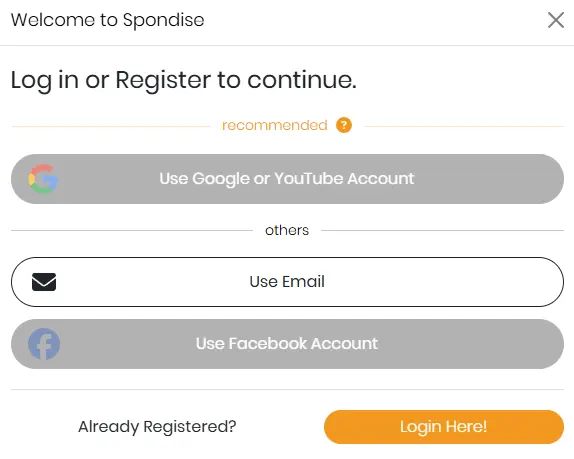
Registration - Google or YouTube
Create your Spondise account using your Google or YouTube credentials. This is the preferred method, as it automatically links your YouTube account to your Spondise profile and synchronizes your channel statistics. You can remove the social linking at any time.
Note: Social media linking and syncing requires additional consent during setup.
Registration - Use Email
Enter your email address and create a strong password. We take security seriously, so don’t go with “password123”, you're better than that.
Registration - Using other Social Media
Spondise may also support account registration through other social media platforms. The principle is the same, using your social media credentials to create a Spondise account, with channel or social statistics automatically synchronized in some cases.
Role Selection: Creator vs. Sponsor
Spondise lets you choose between two roles:
- Creator – Someone with a social media presence who wants to get sponsored.
- Sponsor – A brand, business, or individual promoting something through Creators.
You’ll start with one role, but don’t worry, you can add the second role later if you want to play both sides of the game. When you switch roles, just change it via the dropdown menu and reload the Marketplace page. No need to create an additional account.
Switching Roles
Each role has its own unique profile, including a different username, stats, and reviews. So yes, you’ll essentially have two identities under one account. It’s like having a business card for each side of your hustle.
Pro Tip: Your usernames are role-specific and must be unique. So your Creator username could be @HealthyEats and your Sponsor username could be @SnackProCo—completely separate but managed from one login.
Update Your Public Profile
Your profile is your handshake, elevator pitch, and storefront all rolled into one. Make it count.
- Username: Choose a name that matches your most popular social channel. This helps others recognize you quickly.
- Language: Select the primary language you use online (or your brand’s operating language). Sponsors sometimes require specific languages for campaign content.
- Profile Video: Paste a YouTube link to embed a personal intro, product demo, or brand story video. A face (or logo) speaks louder than text!
- Social Media Linking: Link your active social media accounts, especially if you’re a Creator. Sponsors love transparency, and this boosts your credibility.
Stats: Linked vs. Manual
Some platforms allow full integration (lucky you!), while others may require manual input. If stats like followers or engagement don’t auto-sync, just update them manually. It's your responsibility to keep them fresh, no one likes stale data.
⏱️ Hint: Updated stats improve your profile ranking and visibility in searches.
Verify Your Email and ID
To keep the platform secure for everyone, we ask you to verify your identity. The process is quick, safe, and 100% free.
✅ Here’s what you’ll need:
- A scan or clear photo of your government-issued ID (front and back)
A selfie holding your ID (yes, both your face and the ID should be clearly visible)
The verification process is typically completed within 1-3 business days, but in most cases, it's faster.
To learn more about the verification process, you can check a detailed article here.
That’s it!
Once you’re set up, you can:
- Browse live campaigns (even as visitor possible)
- Apply for listings (as a Creator)
- Post your promotions (as a Sponsor)
- Get matched with ideal partners
- start growing your influence, or your brand.
- And get payouts from you SponBalance (as a Creator)
Welcome to the Spondise Marketplace, where connections happen and promotions come to life.
Share this article
Subscribe for the latest methods to improve revenue!
I am a